Thursday, 2 October 2014

IOS 7 အတြက္ အေရးၾကီး Sources မ်ား


  • http://iphone.gsm.vn/
သူကေတာ႕ Appaddict ဆိုတဲ႕ Appstore ေလး အတြက္ပါ...cracked game ေတြအစံုရွိတဲ႕အၿပင္ သီခ်င္းေတြ Video ေတြပါ ရနုိင္ပါတယ္။
  • http://repo.insanelyi.com/
သူ႕မွာေတာ႕ Cydia Application ေတာ္ေတာ္ မ်ားမ်ား ရဲ႕ cracked ရနုိင္ပါတယ္။ ၀ယ္စရာမလုိေတာ႕ဘူးေပါ့ဗ်ာ ဟိဟိ။
  • http://cydia.myrepospace.com/komin27
ဒီ Sources မွာေတာ႕ က်ေနာ္တို႕ အတြက္ တကယ္ကို အသံုး၀င္ တဲ႕ ... Cydia App ေတြ ရနုိင္ပါတယ္ဗ်။
  • http://cydia.macforus.com/
သူကေတာ႕ ၿမန္မာ ေဖာင္႕ နဲ႕ ကီးဘုတ္အတြက္ပါ။
  • http://cydia.myrepospace.com/thethmuswe
ဒီ Sources ကလည္း http://cydia.myrepospace.com/komin27 နဲ႕ တူတူပါပဲဗ်..Ringtone ေတြပါ ရနုိင္ပါတယ္ဗ်။
  • http://ttkz.me/apt/
က်ေနာ္ တို႕ အတြက္ တကယ္႕ကို အသံုး၀င္မယ္႕ ttkeyboard ရနုိင္မယ္႕ Sources ပါဗ်။
Sources add နည္းကေတာ႕ Cydia>Manage>Sources>Edit>Add 
Enter Cydia/APT URL  ဆိုတဲ႕ box မွာ အေပၚ Sources ေတြကို ရိုက္ထဲ႕ၿပီး add နုိ္င္ပါတယ္ ခင္ဗ်။

ကြန္ပ်ဳတာရွိရင္ ကြန္ပ်ဳတာသံုးရင္ ဒီဟာေလးကိုေတာ့ သိထားသင့္ပါတယ္


ဘာလို ့ဒီလိုေရးလည္းဆိုေတာ့ အသံုးတည့္တယ္ တတ္ထားသင့္တယ္လို ့ထင္တယ္
ျမန္မာစာေရးမရဘူးလို ့ေျပာလာတဲ့သူေတြမွာလည္း ဒီျပႆနာေလးကို ေတြ ့ရလို ့ပါ
အဲ့မွာ Lenguage Bar ေလး   ေပ်ာက္သြားတဲ့လူေတြ ျပန္ေဖာ္ဖို ့ နည္းေလးေတြရယ္
တျခား  ဘာသာစကား တစ္ခုခု  ေျပာင္းရိုက္မယ္ဆို  ဒီစနစ္ကို မျဖစ္မေန သံုးရမွာပါ
အခုေလာေလာဆယ္ ျမန္မာလိုရိုက္မယ္ အဂၤလိပ္လိုရိုက္မယ္ အဲ့ဆိုရင္ Ctrl + Shift
ေျပာင္းျပီး ေရးလို ့ရပါတယ္ ။ တခ်ိဳ  ့ကြန္ပ်ဳတာေတြမွာ  ကလိတာ လြန္သြားျပီးေတာ့
ျၿမန္မာလိုပဲ ရိုက္ရတယ္ ၊ အဂၤလိပ္လိုေရးမရ၊ ေျပာင္းမရျဖစ္တတ္တယ္ ။အလားတူပဲ
အဂၤလိပ္လိုေရးလို ့ရျပီး  ျမန္မာလိုေရးမရတာ ျဖစ္သြားတတ္ပါတယ္ ။  အဲ့လိုအခါမွာ

Apple ေတြ Jailbreakမလိုပဲ Crack Full Appေတြကို ေဒါင္းယူႏိူင္တဲ့ မားကပ္ေလးပါ

ေဒါင္းေလာ့ဆြဲရာတြင္လဲ ၿမန္ပါတယ္ Resume လဲရပါတယ္ ။ မိမိအင္တာနက္ ၿပန္ခ်ိတ္ဆက္မိတဲ့အခါ ေဒါင္းၿပီးသား % ကေန ၿပန္ဆက္ဆြဲေပးပါတယ္ ။

iOS 4.0 ကေန iOS 7.0 ထိ လုပ္ေဆာင္းႏိူင္ပါတယ္ ။
25PP မားကပ္ေလး iPA ဖိုင္ေလးကို ဒီမွာႏွိပ္၍ ေဒါင္းယူပါ ။ အၿမဲအပ္ဒိတ္အသစ္ၿဖစ္ေနမွာပါ သူ႕ဆိုက္မူရင္းေဒါင္းေလာ့လင့္ ခ်ိတ္ေပးထားၿခင္းပါ ။

ဖုန္းထဲသို႕အၿပင္က iPA ေတြကို သြင္းႏိူင္တဲ့ Windows အတြက္ 25PP ေဆာ့ဝဲကို ဒီမွာႏွိပ္၍ေဒါင္းယူပါ ။ အၿမဲအပ္ဒိတ္အသစ္ၿဖစ္ေနမွာပါ သူ႕ဆိုက္မူရင္းေဒါင္းေလာ့လင့္ ခ်ိတ္ေပးထားၿခင္းပါ ။

(( PC အတြက္ 25PP ဟာ Video ။ Music ။ Photo ။ App မ်ားကို Jailbreak မလိုပဲ iTunes ေဆာ့ဝဲသကဲ့သို႕ မိမိ iPhone, iPad and iPod Touch မ်ားထဲသို႕ ၾကိဳက္ရာသြင္းႏိူင္ပါတယ္ ))

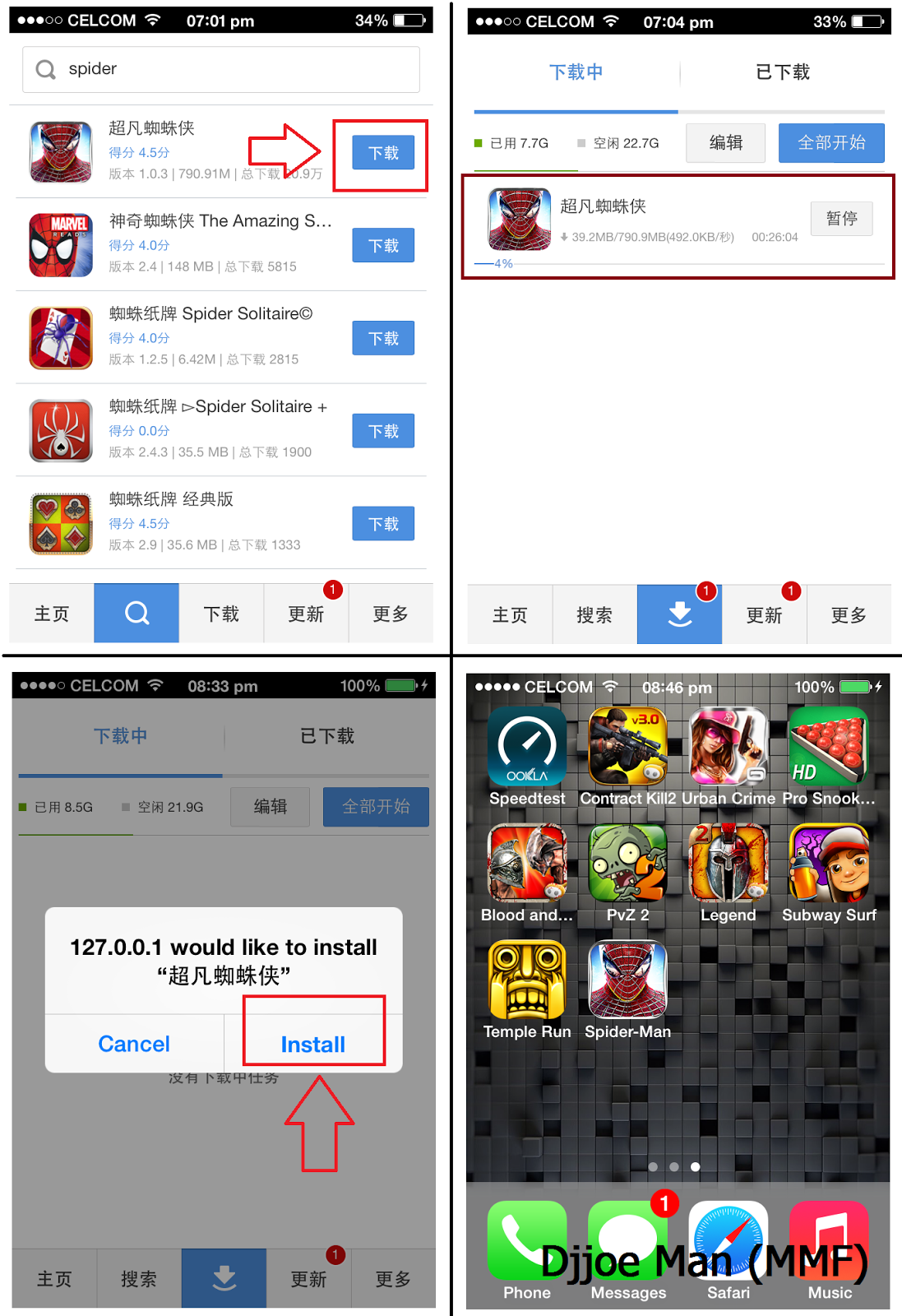
အၿပင္က iPA ဖိုင္သြင္းၿပနည္းကို ေအာက္ပါပံုတြင္ ေလ့လာပါ ။

ပံုညႊန္ၿပရာ 1 >> 2 အဆင့္ကိုႏွိပ္သြားၿပီး မိမိေဒါင္းထားေသာ iPA ဖိုင္ကို သြားေရြးခ်ယ္ေပးလိုက္ၿပီး ညႊန္ၿပရာ 3 အတိုင္း ႏွိပ္လိုက္ပါ အင္စေတာလုပ္ေဆာင္ေနပါၿပီ ။
ၿပီးသြားပါက ဝိုင္းၿပထားသကဲ့သို႕ မိမိဖုန္းထဲမွာ မားကပ္ေလးေရာက္ေနပါၿပီ ။


ၿပီးရင္ေတာ့ မိမိဖုန္းထဲရွိ မားကပ္ကေန ၾကိဳက္ရာကို ေဒါင္းေလာ့ဆြဲလို႔ရပါၿပီ ။
က်ေနာ့္ iPhone iOS 7.0 ၿဖင့္ ေအာက္ပါပံုတြင္ Spider Man ဂိမ္းကို ေဒါင္းေလာ့ဆြဲၿပထားပါတယ္ ။ ဆြဲထားတာၿပည့္သြားပါက Install ဆိုတာေပၚလာပါမယ္ ႏွိပ္လိုက္တာနဲ႕ သင့္စခရင္ေပၚမွာ အိုင္ကြန္ေလးေပၚလာပါၿပီ :) 


အားလံုးပဲ အဆင္ေၿပၾကပါေစ..... :)

Post By : Djjoe Man (MMF) http://freemobilesharing.blogspot.com/2013/11/apple-jailbreak-crack-full-app.html#.UnO5gPviL3V မွကူးယူေဖာ္ျပသည္

Samsung ဖုန္းကိုင္သူမ်ား ဖုန္း Phone Setting တစ္ခုလံုး ျမန္မာစာ ေျပာင္းခ်င္သူအတြက္ Samsung Zawgyi Enabler


ဒီေဆာ့၀ဲကေတာ့ ဖုန္းတစ္ခုလံုးကို ျမန္မာစာနဲ ့ေပၚေစတာမလို ့မိုက္တယ္

ျမန္မာစာမမွန္တာ အျပည့္မေပၚတာ ဖတ္မရတာ မျဖစ္ေတာ့ပဲ အားလံုးကို

Myanmar Language ေျပာင္းပစ္တာ စမ္းခ်င္ရင္ ေအာင္ကလင့္မွာယူပါ

Download - Mssk-samsungzawgyienabler.ap

Window 7 အတြက္ Commands ေတြပါ


Window+R ႏွိပ္ၿပီး Run Box ေခၚၿပီး ရိုက္ရမယ္႕ Commands ေတြပါ ။ Windows 7 အတြက္ပါဗ်။

1. Accessibility Controls - access.cpl
2. Accessibility Wizard - accwiz
3. Add Hardware Wizard - hdwwiz.cpl
4. Add/Remove Programs - appwiz.cpl
5. Administrative Tools - control admintools
6. Automatic Updates - wuaucpl.cpl
7. Bluetooth Transfer Wizard - fsquirt
8. Calculator - calc
9. Certificate Manager - certmgr.msc
10. Character Map - charmap 
11. Check Disk Utility - chkdsk
12. Clipboard Viewer - clipbrd
13. Command Prompt - cmd
14. Component Services - dcomcnfg
15. Computer Management - compmgmt.msc
16. Control Panel - control
17. Date and Time Properties - timedate.cpl
18. DDE Shares - ddeshare
19. Device Manager - devmgmt.msc
20. Direct X Troubleshooter - dxdiag
21. Disk Cleanup Utility - cleanmgr
22. Disk Defragment - dfrg.msc
23. Disk Management - diskmgmt.msc
24. Disk Partition Manager - diskpart
25. Display Properties - control desktop
26. Display Properties - desk.cpl
27. Dr. Watson System Troubleshooting Utility - drwtsn32
28. Driver Verifier Utility - verifier
29. Event Viewer - eventvwr.msc
30. Files and Settings Transfer Tool - migwiz
31. File Signature Verification Tool - sigverif
32. Findfast - findfast.cpl
33. Firefox - firefox
34. Folders Properties - control folders
35. Fonts - control fonts
36. Fonts Folder - fonts
37. Free Cell Card Game - freecell
38. Game Controllers - joy.cpl
39. Group Policy Editor (for xp professional) - gpedit.msc
40. Hearts Card Game - mshearts
41. Help and Support - helpctr
42. HyperTerminal - hypertrm
43. Iexpress Wizard - iexpress
44. Indexing Service - ciadv.msc
45. Internet Connection Wizard - icwconn1
46. Internet Explorer - iexplore
47. Internet Properties - inetcpl.cpl
48. Keyboard Properties - control keyboard
49. Local Security Settings - secpol.msc
50. Local Users and Groups - lusrmgr.msc
51. Logs You Out Of Windows - logoff
52. Malicious Software Removal Tool - mrt
53. Microsoft Chat - winchat
54. Microsoft Movie Maker - moviemk
55. Microsoft Paint - mspaint
56. Microsoft Syncronization Tool - mobsync
57. Minesweeper Game - winmine
58. Mouse Properties - control mouse
59. Mouse Properties - main.cpl
60. Netmeeting - conf
61. Network Connections - control netconnections
62. Network Connections - ncpa.cpl
63. Network Setup Wizard - netsetup.cpl
64. Notepad - notepad
65. Object Packager - packager
66. ODBC Data Source Administrator - odbccp32.cpl
67. On Screen Keyboard - osk
68. Outlook Express - msimn
69. Paint - pbrush
70. Password Properties - password.cpl
71. Performance Monitor - perfmon.msc
72. Performance Monitor - perfmon
73. Phone and Modem Options - telephon.cpl
74. Phone Dialer - dialer
75. Pinball Game - pinball
76. Power Configuration - powercfg.cpl
77. Printers and Faxes - control printers
78. Printers Folder - printers
79. Regional Settings - intl.cpl
80. Registry Editor - regedit
81. Registry Editor - regedit32
82. Remote Access Phonebook - rasphone
83. Remote Desktop - mstsc
84. Removable Storage - ntmsmgr.msc
85. Removable Storage Operator Requests - ntmsoprq.msc
86. Resultant Set of Policy (for xp professional) - rsop.msc
87. Scanners and Cameras - sticpl.cpl
88. Scheduled Tasks - control schedtasks
89. Security Center - wscui.cpl
90. Services - services.msc
91. Shared Folders - fsmgmt.msc
92. Shuts Down Windows - shutdown
93. Sounds and Audio - mmsys.cpl
94. Spider Solitare Card Game - spider
95. SQL Client Configuration - cliconfg
96. System Configuration Editor - sysedit
97. System Configuration Utility - msconfig
98. System Information - msinfo32
99. System Properties - sysdm.cpl
100. Task Manager - taskmgr
101. TCP Tester - tcptest
102. Telnet Client - telnet
103. User Account Management - nusrmgr.cpl
104. Utility Manager - utilman
105. Windows Address Book - wab
106. Windows Address Book Import Utility - wabmig
107. Windows Explorer - explorer
108. Windows Firewall - firewall.cpl
109. Windows Magnifier - magnify
110. Windows Management Infrastructure - wmimgmt.msc
111. Windows Media Player - wmplayer
112. Windows Messenger - msmsgs
113. Windows System Security Tool - syskey
114. Windows Update Launches - wupdmgr
115. Windows Version - winver
116. Windows XP Tour Wizard - tourstart
117. Wordpad - write

မူရင္းလင္႕ခ္ ကေတာ႕ ~ http://pcsupport.about.com/od/commandlinereference/a/run-commands-windows-7.htm


Wednesday, 1 October 2014

Android Pattern, Pin, Password, Gesture Lock ေတြကို sms ပို႔ၿပီး Lock ျဖည္မယ္

ခုမိတ္ဆက္ေပးခ်င္တဲ့ Application ေလးကေတာ့ SMS Bypass လို႔ အမည္ေပးထားတဲ့ Lock ျဖည္တဲ့ apk ေလးနဲ႔မိတ္ဆက္ေပးခ်င္ပါတယ္ …

USB Debugging လဲ On ထားစရာမလိုပါဘူး … Gmail အေကာင့္လဲဝင္ထားစရာမလိုပါဘူး … ဒါေပမဲ့ Root လုပ္ထားတဲ့ ဖုန္းျဖစ္ၿပီး ဖုန္းမွာ SMS Bypass Application ကိုသြင္းထားဖို႔ေတာ့လိုပါတယ္ … Play store မွာေတာ့ ျမင္တဲ့အတိုင္းပါပဲ … MMAS မွာေတာ့ ဝယ္ၿပီးအသုံးျပဳလို႔ … ျပန္လည္မွ်ေဝလိုက္ပါတယ္ …

အသံုးျပဳပံုေလး နဲနဲရွင္းျပပါမယ့္ခဗ်ာ …

၁။ ပထမဦးဆံုးအေနနဲ႔ SMS Bypass ကို ေဒါင္းလုပ္ရယူၿပီး Install လုပ္ပါ။ ၿပီးလွ်င္ SMS Bypass ကိုဖြင့္ပါ။

၂။ SMS Bypass Service ကို On ေပးပါ။

၃။ Change preset keyword ကိုတစ္ခ်က္ႏွိပ္ပါ။ Old secret code မွာ ပထမဦးဆံုးအႀကိမ္စသံုးတဲ့ users အတြက္ ဘာမွျဖည့္စရာမလိုပါဘူး။ ဒါမွမဟုတ္ မိမိႀကိဳက္ရာ ဂဏန္း ၄ လံုးျဖည့္လိုက္ပါ။ New Sercret code နဲ႔ Confirm new secret code မွာေတာ့ မိမိ အသံုးျပဳခ်င္တဲ့ Code ၄ လံုးကို ထည့္ေပးလိုက္ပါ။ က်ေနာ္ကေတာ့ 1234 လို႔ပဲထည့္ေပးလိုက္တယ္။ ၿပီးရင္ Save secret code ဆိုတာေလးကိုႏွိပ္ေပးလိုက္ပါ။

၄။ ဒါဆို SMS Bypass ကိုစတင္အသံုးျပဳလို႔ရပါၿပီ။ မိမိ ယခုလုပ္ေဆာင္ခ်က္မ်ား ကိုျပင္ဆင္ထားတဲ့ဖုန္းကို Lock Screen ဆိုသို႔သြားထားပါ။ ထို႔ေနာက္ အျခားဖုန္းတလံုးမွ မိမိ SMS Bypass application သြင္းထားတဲ့ဖုန္းသို႔ message ပို႔ရပါမယ္။ Message ထဲမွာ ဘာထည့္ရိုက္ေပးရမလဲဆိုေတာ့ ” 1234 reset ” ဆိုတာေလးပဲထည့္ရိုက္ၿပီး Regular sms ျဖင့္ Send လိုက္ပါ။

၅။ SMS Bypass Application သြင္းထားေသာ Lock ရွီသည့္ဖုန္းမွာ Reboot ၾကသြားပါလိမ့္မည္။ Reboot ျပန္တက္လာပါက Lock မ်ားရွီေတာ့မည္မဟုတ္ပါ။ အဆင္ေျပစြာအသံုးျပဳႏိုင္ၾကပါေစ ….

SMS Bypass >>> http://www.mediafire.com/download/vyr4cgg5b151e4a/SMS+Bypass+v1.3.apk
Photo: Android Pattern, Pin, Password, Gesture Lock ေတြကို sms ပို႔ၿပီး Lock ျဖည္မယ္ ========================================  ခုမိတ္ဆက္ေပးခ်င္တဲ့ Application ေလးကေတာ့ SMS Bypass လို႔ အမည္ေပးထားတဲ့ Lock ျဖည္တဲ့ apk ေလးနဲ႔မိတ္ဆက္ေပးခ်င္ပါတယ္ …  USB Debugging လဲ On ထားစရာမလိုပါဘူး … Gmail အေကာင့္လဲဝင္ထားစရာမလိုပါဘူး … ဒါေပမဲ့ Root လုပ္ထားတဲ့ ဖုန္းျဖစ္ၿပီး ဖုန္းမွာ SMS Bypass Application ကိုသြင္းထားဖို႔ေတာ့လိုပါတယ္ … Play store မွာေတာ့ ျမင္တဲ့အတိုင္းပါပဲ … MMAS မွာေတာ့ ဝယ္ၿပီးအသုံးျပဳလို႔ … ျပန္လည္မွ်ေဝလိုက္ပါတယ္ … :P  အသံုးျပဳပံုေလး နဲနဲရွင္းျပပါမယ့္ခဗ်ာ …  ၁။ ပထမဦးဆံုးအေနနဲ႔ SMS Bypass ကို ေဒါင္းလုပ္ရယူၿပီး Install လုပ္ပါ။ ၿပီးလွ်င္ SMS Bypass ကိုဖြင့္ပါ။  ၂။ SMS Bypass Service ကို On ေပးပါ။  ၃။ Change preset keyword ကိုတစ္ခ်က္ႏွိပ္ပါ။ Old secret code မွာ ပထမဦးဆံုးအႀကိမ္စသံုးတဲ့ users အတြက္ ဘာမွျဖည့္စရာမလိုပါဘူး။ ဒါမွမဟုတ္ မိမိႀကိဳက္ရာ ဂဏန္း ၄ လံုးျဖည့္လိုက္ပါ။ New Sercret code နဲ႔ Confirm new secret code မွာေတာ့ မိမိ အသံုးျပဳခ်င္တဲ့ Code ၄ လံုးကို ထည့္ေပးလိုက္ပါ။ က်ေနာ္ကေတာ့ 1234 လို႔ပဲထည့္ေပးလိုက္တယ္။ ၿပီးရင္ Save secret code ဆိုတာေလးကိုႏွိပ္ေပးလိုက္ပါ။  ၄။ ဒါဆို SMS Bypass ကိုစတင္အသံုးျပဳလို႔ရပါၿပီ။ မိမိ ယခုလုပ္ေဆာင္ခ်က္မ်ား ကိုျပင္ဆင္ထားတဲ့ဖုန္းကို Lock Screen ဆိုသို႔သြားထားပါ။ ထို႔ေနာက္ အျခားဖုန္းတလံုးမွ မိမိ SMS Bypass application သြင္းထားတဲ့ဖုန္းသို႔ message ပို႔ရပါမယ္။ Message ထဲမွာ ဘာထည့္ရိုက္ေပးရမလဲဆိုေတာ့ ” 1234 reset ” ဆိုတာေလးပဲထည့္ရိုက္ၿပီး  Regular sms ျဖင့္ Send လိုက္ပါ။  ၅။ SMS Bypass Application သြင္းထားေသာ Lock ရွီသည့္ဖုန္းမွာ Reboot ၾကသြားပါလိမ့္မည္။ Reboot ျပန္တက္လာပါက Lock မ်ားရွီေတာ့မည္မဟုတ္ပါ။ အဆင္ေျပစြာအသံုးျပဳႏိုင္ၾကပါေစ ….  SMS Bypass >>>   http://www.mediafire.com/download/vyr4cgg5b151e4a/SMS+Bypass+v1.3.apk

ကင္ဆာအသစ္တစ္ခု ေတြ႕ရွိ

U Than Win's photo.
U Than Win's photo.


အေမရိကကာ Dr. Brian Berry ဆုိသူဟာ လူသားေတြမွာ ျဖစ္ႏုိင္တဲ့ ကင္ဆာအသစ္ေတြ႕ရွိထားတယ္လုိ႔ဆုိပါတယ္။ အဲဒီ ေရာဂါဟာ ေငြေရာင္ ႏုိင္ထရုိေအာက္ဆီဂ်င္ကေန ျဖစ္ႏုိင္ေၾကာင္း ေျပာျပထားပါတယ္။
သတိေပးထားတာက: ဖုန္းေငြျဖည့္ကဒ္ေတြက ခဲသားေတြကုိ လက္သဲနဲ႔မျခစ္ပါနဲ႔၊ အဲဒီမွာ အသားအေရကင္ဆာကုိ ျဖစ္ေစႏုိင္တဲ့ ဓါတ္ေတြ ပါေနလုိ႔ပါ။ တစ္ခုခုနဲ႔ ျခစ္ေပါ႔။
ဒါေတြကုိ သင္ခ်စ္ခင္တဲ့သူေတြဆီကုိလည္း ျဖန္႔ေပးဖုိ႔ သူမွာထားပါေသးတယ္။
အေရးႀကီးတဲ့ က်န္းမာေရး အႀကံျပဳခ်က္:
၁။ ဖုန္းလာရင္ ဘယ္ဘက္နားကပဲ ေျဖစကားေျပာပါ
၂။ ေဆးေသာက္တဲ့အခါ ေရခဲေရေတြနဲ႔မေသာက္ပါနဲ႔
၃။ ညေန 5 နာရီေနာက္ပုိ္င္း သိပ္မ်ားမ်ား မစားပါနဲ႔
၄။ ေရကုိ မနက္ပုိင္းမွာ မ်ားမ်ားေသာက္ၿပီး၊ ညဘက္ေတြမွာ ေလွ်ာ့ေသာက္ပါ
၅။ ညဘက္ 10 နာရီနဲ႔ မနက္ 4 နာ၇ီၾကားမွာ ေကာင္းေကာင္းအိပ္ပါ
၆။ အစားအစာနဲ႔ ေဆးေသာက္ပီးေနာက္ ခ်က္ခ်င္း မလဲေလ်ာင္းပါနဲ႔
၇။ ဖုန္းဘတၱရီက ေနာက္ဆံုး အတံုးေလးက်န္တဲ့ အခါ ဖုန္းအ၀င္လက္မခံပါနဲ႔၊ အဲဒီအခ်ိန္မွာ ဖုန္းရဲ႕ ေရာင္ျခည္ျဖာထြက္ႏႈန္းက 1000 ႀကိမ္ေလာက္ အားျပင္တဲ့အတြက္ပါ---တဲ့။
ေနာက္သူေျပာထားပါေသးတယ္---- ဒီအေၾကာင္းအရာေတြနဲ႔ပတ္သက္ၿပီး သင္ဂရုစိုက္မလုိတဲ့သူေတြဆီလည္း share ေပးဖုိ႔ေပါ႔။
ၾကင္နာမႈက ဘာမွ ကုန္က်မႈ မရွိေၾကာင္းကုိလည္း သူေျပာထားပါေသးတယ္။
လြယ္လြယ္နဲ႔ကင္ဆာျဖစ္ေစႏုိင္တဲ့ အေျခေနကို ေရွာင္ႏုိင္ၾကပါေစ!
ဘာသာျပန္မေခ်ာတာေၾကာင့္ နားလည္ပါ-----
ေမတၱာျဖင့္
Government Jobs Portal
https://www.facebook.com/GovernmentJobsZone
Must Read And Share
**********************
Dr. Brian Berry of the United States has found new cancer in human beings, caused by Silver Nitro Oxide. Whenever you buy recharge cards, don’t scratch with your nails, as it contains Silver Nitro Oxide coating and can cause skin cancer. Share this message with your loved ones.
Important Health Tips:
1. Answer phone calls with the left ear.
2. Don't take your medicine with cold water....
3. Don't eat heavy meals after 5pm.
4. Drink more water in the morning, less at night.
5. Best sleeping time is from 10pm to 4 am.
6. Don’t lie down immediately after taking medicine or after meals.
7. When phone's battery is low to last bar, don't answer the phone, bcos the radiation is 1000 times stronger.
Can you Share this to people you care about?
I just did,
Kindness costs nothing
But Knowledge is power